Free AVR fuse programmer for Mac OS X by Jason von Nieda
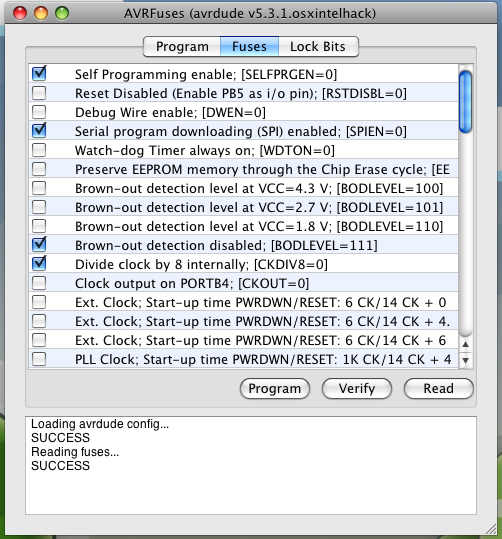
AVRFuses is a simple fuse programmer for the AVR series of microcontrollers from Atmel. It is written to mimic the look, feel and utility of the AVR Studio fuse programmer.
The primary useful feature of AVRFuses is that it lets you intelligently select which fuses to set just like in AVRStudio. You don’t need to know bit numbers or have the data sheet handy like in most other programmers. It does this by using the exact same part configurations as AVR Studio does. AVR Studio is free from Atmel, but it only works in Windows. This program was written to bring some of it’s functionality to Mac OS X.
Downloads
Releases: https://github.com/vonnieda/AVRFuses/releases
Source Code: https://github.com/vonnieda/AVRFuses
Previous Versions
AVRFuses_1.5.2 version 1.5.1 for Mac OS X
AVRFuses_1.5.1 version 1.5.1 for Mac OS X
AVRFuses_1.5.0 version 1.5.0 for Mac OS X
AVRFuses_1.4.13 version 1.4.13 for Mac OS X
AVRFuses_1.4.12 version 1.4.12 for Mac OS X
AVRFuses_1.4.11 version 1.4.11 for Mac OS X
AVRFuses_1.4.10 version 1.4.10 for Mac OS X
AVRFuses_1.4.9 version 1.4.9 for Mac OS X
hi Jason
Thanks for spending time to create AVRFuses.
I have been trying to keep minimal changes to the Makefile created by AVRStudio4 so that my work on the Mac will be seamless when used back on the PC. AVRStudio Makefile generates EEPROM hex files with ‘eep’ extension, and your current version of AVRFuses doesn’t allow selection of such files; I have to make that amendment either by renaming or editing Makefile for every project.
How about this minor inclusion in the next version?
I am hoping to have some time to develop tools on Mac OS X as well…
Thanx.
“Howey”
Is AVRFuses open source?
Great utility!!! Very usefull for beginners like me. Thanks.
Absolutely astounding, AVRfuses was suggested to me at exactly the right moment: I wanted to make an ATmega8 run off an external crystal and I was quite worried about getting the fuses right, as I have already locked myself out of a tiny2313 in the past by accidentally disabling /RESET. This made it a breeze.
Thank you very much!
This is fantastic – thanks so much!
Please keep up the excellent work, and develop this further!
I get the error “avrdude” config file not found…in the path to avrdude i just type “avrdude”…im using MacPack on leopard and avrdude works fine through the command line
whats wrong?
Hi,
cool program. but I have a problem with the fuses of an atmega644. I can read the fuses and write the exact same fuses back. But if i change something (for example deactivaiong JTAG) I get the following error:
avrdude: verification error, first mismatch at byte 0x000
0xd9=!0x99
avrdude: verification error; content mismatch
FAILED
any idea?
Hello,
Does AVRFuses work with AVRMacPack?
I have installed AVRMacPack on my MacBook and entered the installation location for AVRMacPack as the “Path to avrdude”.
The following output message appears:
Loading avrdude config …
SUCCESS
FAILED
Any suggestions?
Thanks
Hi Jason,
Thanks for this little program, I find it really useful! I have found it while looking for replacement for FUSE calculator, when my favourite web was down:
http://www.engbedded.com/cgi-bin/fc.cgi/
Development suggestion: I see you have little output window down at the bottom. It would be really nice if you can display the actual avrdude command executed. This would enhance value of this program in two ways – 1) to get an idea what command is issued 2) educate people how to use avrdude command properly (as sometimes it’s little tricky)
I have also discovered one issue: When selecting a slower baud rate i.e. 4800 in the Preferences, all operations always fails. When using command line (-B 4800) it works fine.
Well, AVRFuses did work with AVRMacPack for me, just that you have to set the right path for avrdude which is a hidden file.
I went to the applications folder, where shortcut to AVRMacPack manual was located and right clicked it to show the original file. Avrdude was lying someone there.
For more details, you can visit :
http://kshdeo.blogspot.com/2009/03/avr-fuse-programmer-for-mac.html
Jason:
Could you modify the Fuses window so that it scrolls horizontally as well as vertically? I’d like to be able to read all of the information off the right-hand side of the window.
Thanks.
dmc
Thanks a lot for the program, helped me mess with fuses on some AVR’s it’s way easier than messing with avrdude. Also thanks for outputting the command line that is very useful to see what is happening.
And another request (don’t you just love it…). Would it be possible to specify where the avrdude.conf file is located ?
Very useful program and thanks for putting in the effort.
–jim
Hi,
this is a wonderful tool.
Using AVRFuses.exe version 0.5.0.0 for .NET
I recognized that no ATmega328p support is available,
although avrdude is prepared for this chip.
Because the m328p is now very popular,
it would help many people if could include support for
this.
Kind regards
Ekkehard
Great Program! Looks nice and works like a charm on my mac!
Daniel
what’s the function of ‘read’ button? what is this button’s behavior? (I’m a fist-timer so I am bit afraid of spoiling my uc)
Welcome
There is a floating “display fuses” button in this program.
Can you fix and update?
Best regards
Michal Przybyl
By the way – very usefull program
Hello Jason,
I bought ” 51 AVR ISP Programmer ” from eBay, but when I typed ” ls / dev ”
in the terminal, the new device was not found. In my system settings for
usb port, the new device is called ” XWUSBASP ” and made by ” XWOPEN “.
Can you please support my programmer, please.
Hello!
AVR Fuses is a great program! Thank you very much!
But I have one problem. The Fuses texts are not shown completely and appear truncated. Could you please fix this? That would be really great!
Best regards
Just tried it on a mac to deactivate the external crystal for the internal one in my Arduino.
Works like a charm, although I did struggle to understand that I had to double-click to select the fuse I wanted. Still, great program. 🙂
Support for attiny4313 would be nice. Or can I add support myself?
I just want to thanks to you!
thank you.
Hi, thanks for your great work! Just a little feedback for the new Update (V 1.4.7): Resize the Window while in the Fuses Tab and the “Low”, “High” and “Extended” Labels stay at their position instead of moving with the textfields. If you could fix that…?
Hi Jason,
dealing with a nasty problem on Mountain Lion (avrdude stopped to wark together with the avrisp MKII) I found your comment on http://avr.2057.n7.nabble.com/avrdude-slow-to-start-in-OS-X-with-AVRISP-mkII-USB-patch-included-td2164.html
which then lead me to this page. So I want to thank you very much. The patch you mentioned there really did the trick for me to be able to use the AVRISP MKII with Mountain Lion together with libusbx and libusb-compat. Not sure if this solves the root cause, but as a work-around it did the job.
I also like AVRFuse. Especially the Fuse part. Even I’m familiar with bits and bytes, it is always a good Idea to have a guided way to change those critical bits 🙂
Hi,
I installed AVRfuses 1.4.6 on a mac running OS X 10.7.5 (11G3), as soon as I launch AVRfuses, the application quites.
Is AVRfuses compatible with Mac OS X Lion ?
Best Regards
Al
Hi, Jason!
I’m having problems getting AVRFuses working on 10.8.5 with a plain installation of CrossPack. ‘avrdude’ is version 5.11.1, and it’s at /usr/local/CrossPack-AVR/bin/avrdude. When AVRFuses comes up and displays the panel to select the programmer preferences, the programmer pull down is empty.
I make a symlink to avrdude in /usr/local/bin, but that didn’t help.
I looked for any hard-coded paths in your executable, but didn’t see any, so… I’m trying to figure out what’s so different on this system from yours.
Any clues?
Thanks!
Jason fixed my problem by pointing me to AVRFuses 1.4.7, which works great. Thanks, Jason!
Hi Jason
can you tell me how mike’s problem fixed?
I’m having problem same like Mike.
I really appreciate the programm. Eclipse avr plugin failed on my mac. This tool flashed the hex file. Thanks a lot!
Hi Jason
I just love AVRfuses : it’s so helpful to me
Just 1 little wish : I would like to copy the commands displayed in the bottom window but I cannot
could you make them copy-able ?
Many thanks
Hi Jason,
very useful program. Thanks. Please, can you add, in the FUSE page, also the LOCKBIT fuses ?
Thanks a lot !!! 🙂
Hi Friends,
I got the failure “loading AVR config” FAILURE
Where is the avrdude located on Mac OS X?
Thanks, Stefan
Hello!
Thank You, it works fine with my Atmega 128A. Only one short remark is that i have to select the Atmega128 option even for my 128A also otherwise it does not work. It was a little bit confusing for the first time but nevertheless it’s a “must have” tool for the AVR programmers under OSX.
Regards,
Lóránt
Need for windows XP
Thank you sooo much for the latest update allowing to copy from the log windows !
Very useful do develop some productivity scripts
Thanks a lot
Jean-Luc
The program won’t launch for me. Details:
Process: launchd [730]
Path: /Users/xxx/Desktop/electro/arduino/AVRFuses.app/Contents/MacOS/AVRFuses
Identifier: org.vonnieda.AVRFuses
Version: ??? (???)
Code Type: X86 (Native)
Parent Process: launchd [94]
Date/Time: 2016-02-01 20:38:25.301 -0800
OS Version: Mac OS X 10.6.8 (10K549)
Report Version: 6
Interval Since Last Report: -14268981 sec
Crashes Since Last Report: 31
Per-App Crashes Since Last Report: 2
Anonymous UUID: E155CCA3-4ED0-4183-8E4B-BBC7B26AAF8F
Exception Type: EXC_BAD_ACCESS (SIGSEGV)
Exception Codes: KERN_INVALID_ADDRESS at 0x00000000fffffffc
Crashed Thread: Unknown
Backtrace not available
Unknown thread crashed with X86 Thread State (32-bit):
eax: 0x00000055 ebx: 0x00000000 ecx: 0x00000000 edx: 0x00000000
edi: 0x00000000 esi: 0x00000000 ebp: 0x00000000 esp: 0x00000000
ss: 0x0000001f efl: 0x00010203 eip: 0x8fe01030 cs: 0x00000017
ds: 0x0000001f es: 0x0000001f fs: 0x00000000 gs: 0x00000000
cr2: 0xfffffffc
Binary images description not available
Model: MacBookPro1,1, BootROM MBP11.0055.B08, 2 processors, Intel Core Duo, 2.16 GHz, 2 GB, SMC 1.2f10
Hello Jason,
I could not run the latest version (AVRFuses 1.4.11) unfortunately, because I can use only Apple OSX 10.11.6 on my Mac. I would be very happy if you could adapt the app for this operating system.
Best regards
Jan
Hello ALL
this software really works, and this is what is important!
BTW does any of you know what does + 0ms, + 4 ms, + 64 ms means when selecting the clock?
Best.
Hi
using Mac version and I am happy with it!
Where to download Windows version?
Best.
Hi, where the AVRFuses.parts should stay in a Mac? The ‘Programmer’ list is empty in my AVRFuses…
Hi,
I wonder whether there will be a 64bit version of AVR Fuses, so that it can run on Catalina (macos 10.15).
Thanks Bernhard, I didn’t realize Catalina was 64 bit only. I will work on getting a new release pushed.
Hi Jason, when can we expect a new version? And if there will be one, could you perhaps also add lock bits?
Cheers & thanks for this useful piece of software!
Bernhard
Hi.. please add lock bits (tabs) for AVRDUDE v6.4 using BigSur Mac OS
Thanks
Hi, It appears that the latest version of avrdude (7.0) no longer accepts the -s option. Is it possible to make it optional via the preferences (so as to ensure backwards compatibility with previous versions)?
Thanks in advance, best regards,
Guglielmo
——————————————————————————
Usage: avrdude [options]
Options:
-p Required. Specify AVR device.
-b Override RS-232 baud rate.
-B Specify JTAG/STK500v2 bit clock period (us).
-C Specify location of configuration file.
-c Specify programmer type.
-D Disable auto erase for flash memory
-i ISP Clock Delay [in microseconds]
-P Specify connection port.
-F Override invalid signature check.
-e Perform a chip erase.
-O Perform RC oscillator calibration (see AVR053).
-U :r|w|v:[:format]
Memory operation specification.
Multiple -U options are allowed, each request
is performed in the order specified.
-n Do not write anything to the device.
-V Do not verify.
-t Enter terminal mode.
-E [,] List programmer exit specifications.
-x Pass to programmer.
-v Verbose output. -v -v for more.
-q Quell progress output. -q -q for less.
-l logfile Use logfile rather than stderr for diagnostics.
-? Display this usage.
avrdude version 7.0, URL: